3D avatar heads that would've taken days to model and render — I made in seconds.
Building this cast the traditional way means sculpting ten heads in a 3D app, rigging each one for facial expressions, hand-placing lighting rigs, then tuning render settings and waiting on a laptop that isn't built for heavy rendering. Instead: one image prompt locked the whole 3D-render look across ten characters, and one animation prompt brought them to life. No modeling software, no rigging, no lighting setup, no render queue. Both prompts, in full, below — copy and reuse them.
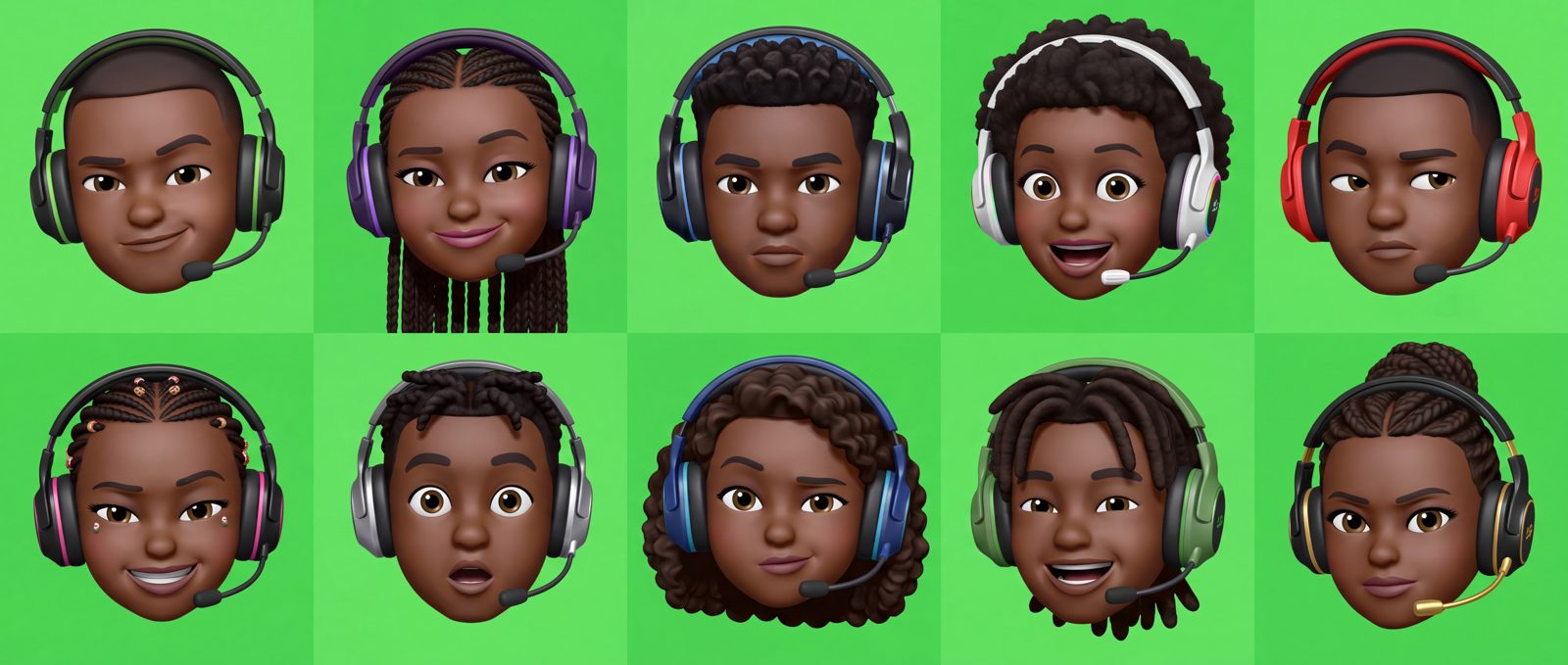
Overview
Three tools, three jobs.
Nano Banana 2.0
Generates the still portraits — one long prompt describing a shared style plus ten separate character variations, delivered as a single reference sheet.
Seedance 2.5
Takes that same sheet and animates every head in place — blinking, glancing, subtle head tilts — while locking size, position, and identity.
AE · Keylight 2.0
Pulls the green background out of the animated clip, leaving each head on a transparent alpha channel ready to drop anywhere.
Generate the avatar sheet
nano banana 2.0 · text-to-imageThe image prompt does two things at once: it fixes a "house style" that every character has to obey, then it lists ten short character briefs so each face, hairstyle, headset, and expression comes out different. Read it once as a template, then swap the ten bullet points for your own cast.
Set the canvas to a 21:9 aspect ratio before generating.
A square or 16:9 frame squeezes ten heads into rows that end up small and cramped, or forces the model to crop some out. Going ultra-wide (21:9) gives each character its own honest tile — five per row across two rows — so every hairstyle, headset, and expression stays big enough to actually read as different.
Open Nano Banana 2.0 and paste the full prompt below as one message.
Don't split it into separate turns — the model needs the whole style + variation list together to keep every head consistent.
Check the sheet for identity drift before moving on.
Same green, same lighting, same camera distance across all ten. If one head is zoomed differently or the background shade shifts, regenerate before you animate — that error compounds in step 2.
Export the full sheet as your reference image for the animation step.
Seedance 2.5 needs the composed grid, not the individual crops, so it can preserve spacing between characters.
Create a premium collection of 10 separate 3D gaming avatar head portraits, inspired by the clean, glossy emoji/avatar style of the reference image. Each character should be head-and-shoulders only, centered and isolated, with no body, no props, and no surrounding objects. Use a minimal solid bright green background with plenty of negative space.
All characters should have realistic deep/dark Black Nigerian skin tones, polished expressive facial features, smooth stylized 3D rendering, subtle realistic skin texture, glossy eyes, soft studio lighting, and a high-end gaming-brand aesthetic. Every avatar must wear a distinct modern gaming headset with a microphone, with different headset shapes and designs across the characters.
Create these 10 distinct variations:
Young Nigerian male gamer — short low fade haircut, confident smirk, slightly raised eyebrow, black-and-green gaming headset.
Young Nigerian female gamer — long neat braids pulled back, playful confident smile, purple-and-black gaming headset.
Nigerian male gamer — short curly textured hair, focused serious expression, large futuristic black headset with blue accents.
Nigerian female gamer — natural afro hairstyle, excited wide-eyed expression, white-and-black gaming headset with subtle RGB details.
Nigerian male gamer — clean haircut with sharp line-up, skeptical side-eye expression, oversized red-and-black gaming headset.
Nigerian female gamer — neat cornrows with small decorative beads, mischievous grin, sleek black headset with pink accents.
Nigerian male gamer — short twists, surprised expression with raised eyebrows and slightly open mouth, futuristic silver-and-black headset.
Nigerian female gamer — shoulder-length natural curls, thoughtful expression with one eyebrow raised, blue-and-black gaming headset.
Nigerian male gamer — medium-length dreadlocks tied back, laughing expression, chunky green-and-black gaming headset.
Nigerian female gamer — elegant braided bun, determined competitive expression, premium black-and-gold gaming headset.
Keep the same overall avatar design language across all 10, but make each face, hairstyle, headset, gender presentation, and expression clearly different. No text, no logos, no controllers, no phones, no hands, no clothing visible beyond a tiny neckline if necessary. The result should look like a professional set of gaming-community profile avatars, not generic corporate emojis.
Composition: one avatar per image, centered, front-facing or slight 3/4 angle, large head filling most of the frame, bright green seamless background, consistent camera angle and lighting, high-detail 3D render, clean edges, polished glossy finish, 4K quality.
Animate the sheet in place
seedance 2.5 · image-to-videoThis prompt is almost entirely defensive. Because all ten heads share one frame, the biggest risk is drift — heads growing, sliding, or bleeding into each other's space. So the prompt spends most of its length locking scale and position, and only a smaller part actually asking for life: blinking, glances, and tiny head turns.
Upload the finished sheet from step 1 as the reference image.
Seedance 2.5 animates from that exact frame, so any inconsistency you missed earlier will now animate too.
Paste the full animation prompt as a single instruction.
Keep the "lock" and "restriction" sections intact even if you shorten the rest — those are the lines doing the work of stopping zoom drift and character bleed.
Review the render for boundary breaks before publishing.
Watch the edges between avatars first. If a headset or hairline crosses into a neighbor's tile, tighten the "strict frame and scale" section and re-run.
Animate the provided Nigerian gaming avatar collection while preserving the exact character designs, skin tones, hairstyles, gaming headsets, facial features, proportions, positions, spacing, and overall 3D style from the reference image. Each avatar must remain completely separated in its own original space, with the exact same green background and composition.

LIVELY FACIAL ANIMATION
Make every avatar feel clearly alive, expressive, and energetic, not static. Add natural blinking with different timing for every character. Add subtle but noticeable eye movement. Keep the eyes primarily locked toward the camera/viewer, even while the head moves. Allow occasional quick eye glances left, right, up, or down before naturally returning to camera. Give every avatar a different facial-expression sequence. Animate eyebrows naturally: raised eyebrows, lowered brows, subtle eyebrow arches, skeptical looks, focused brows, etc. Include expressive smiles, smirks, playful looks, surprised reactions, confident looks, focused esports expressions, excited expressions, and mischievous expressions. Make cheeks, eyelids, eyebrows, and mouth move naturally with the expressions. Expressions should be clearly visible and lively, but never exaggerated into cartoon distortion. Do not make every character perform the same expression or movement.

SUBTLE 3-AXIS HEAD ROTATION
Give every avatar a minimal natural head rotation across all three axes: Y-axis: subtle left/right head turns. X-axis: slight upward/downward head movement. Z-axis: subtle natural head tilts. Keep all rotations small and controlled. The head should feel like a real person naturally reacting, never like a robotic object rotating or spinning. Combine the head movement with the facial expressions and eye animation so the character feels genuinely alive.

FACE & EYE LOCK
Even when the head rotates, the avatar should maintain natural visual engagement with the viewer. The eyes should remain primarily directed toward the camera, creating a subtle face-to-camera lock. The character can briefly glance away, but should naturally return its gaze toward the viewer. Do not allow the eyes to drift independently, become misaligned, or look disconnected from the face.

STRICT FRAME & SCALE
Keep every avatar EXACTLY the same size, position, and framing as shown in the original image. DO NOT zoom in, zoom out, enlarge, shrink, expand, reposition, or reframe any avatar. All animation must happen inside each avatar's existing allocated area. During head rotation, blinking, eye movement, and facial expressions: Never allow the head to become larger. Never allow the character to move outside its original position. Never allow the headset, hair, face, or head to extend beyond its original boundaries. Never crop any part of the avatar. Never let one avatar enter another avatar's space. Never change the spacing between avatars. Never change the original green background composition.

CHARACTER CONSISTENCY
Preserve each character's: Exact face identity, Skin tone, Hairstyle, Gaming headset, Facial proportions, Character design, Position, Scale. Do not merge, morph, duplicate, swap, or redesign characters.

MOTION RESTRICTIONS
No body movement. No hand movement. No talking. No lip-sync. No camera movement. No camera zoom. No scene transition. No character scaling. No character repositioning. No background movement. No morphing. Keep the bright green background completely static and uniform.

FINAL LOOK
The final animation should feel like a premium Nigerian gaming-community avatar animation where every character is visibly alive through blinking, eye contact, expressive eyebrows, lively facial expressions, subtle 3-axis head rotation, and natural head tilts. The animation should feel human, confident, playful, and energetic, while maintaining the exact original size, framing, spacing, and composition throughout the entire animation.
output — seedance 2.5 · same sheet, now blinking, glancing, and tilting in place
Key out the green background
after effects · keylight 2.0The bright green background from steps 1 and 2 wasn't just a style choice — it's a chroma key. Once the animated sheet is ready, drop it into After Effects and pull the green out with Keylight 2.0, so each head can sit on a transparent background and get placed anywhere: a stream overlay, a card, a website, a game lobby.
Import the rendered video and apply Keylight 2.0.
In After Effects, drop the clip on a new composition, then search the Effects panel for "Keylight (1.2)" and drag it onto the layer.
Set the Screen Colour with the eyedropper on the green background.
Click the Screen Colour swatch, then sample a flat area of green between two of the heads. Because the background was generated as one flat, seamless green, Keylight usually pulls a clean matte on the first try.
Check the matte in View: Screen Matte before trusting it.
Heads should read solid white, background solid black, with no grey noise around hair or headset edges. If the edges look patchy, nudge Screen Gain and Screen Balance until the matte cleans up.
Switch back to Final Result and fine-tune the edges.
Use Screen Shrink/Grow and Screen Softness to tighten any green fringe left around the headset mics and hair strands, then export with an alpha channel so the background stays transparent wherever you place it next.
Field notes
What actually breaks, and why.
Green tone changes between heads
Happens when "bright green background" is left vague. Naming it once — "minimal solid bright green," "seamless" — and repeating "consistent lighting" in the composition line keeps every tile matching.
One avatar drifts into another's tile
This is what the whole "strict frame and scale" block in the animation prompt is for. If it still happens, shorten the expression list per character — too many simultaneous movements is what pushes a head past its boundary.
Variations feel repetitive despite different hair
Pair the hairstyle with a distinct expression and a distinct headset color every time, like the ten briefs above. Repeating any one of the three across characters is what makes a set read as "reskins."
Ten heads on a standard frame come out tiny or cropped
This is the whole reason for the 21:9 aspect ratio. A square or 16:9 canvas forces the model to either shrink each head to fit or drop some out of frame. 21:9 gives ten tiles enough real width to lay out five-per-row across two rows, so every headset and hairstyle stays legible at full size.
Animated avatar looks alive but disconnected
The "face and eye lock" section exists because motion models default to letting eyes drift with the head. Keep that clause even if you cut other sections — it's what keeps the camera-facing feel.